
Did you know that APIs now account for 83% of internet traffic, yet 40% of API vulnerabilities remain undetected until a breach occurs? In 2018, Facebook suffered a massive data leak, exposing 50 million user accounts due to weak API token security—an alarming reminder of the risks lurking in poorly protected APIs.
As businesses rely on MuleSoft to connect critical systems, API security is no longer optional—it’s essential. A single vulnerability can expose sensitive data, disrupt services, and damage brand trust. Let’s explore MuleSoft’s top security risks—and how to prevent them.
The Importance of MuleSoft API Security in Modern Integrations
In today’s digital-first world, APIs drive over 83% of internet traffic, fueling everything from cloud applications to enterprise integrations. But with rapid adoption comes growing security threats—API attacks have surged 681% in the past year alone.
The Rise of API Attacks Over Time
- 2018: APIs were responsible for 40% of data breaches
- 2021: The Facebook API token leak exposed 50M+ accounts
- 2023: OWASP reported API security risks as the #1 attack vector
Why API Security Matters More Than Ever
APIs seamlessly connect applications, enabling real-time data exchange. But without strong security, they become a gateway for hackers to access sensitive information.
- Cloud Adoption = More Attack Surfaces: With businesses moving to the cloud, unsecured APIs expose customer data, financial records, and internal systems.
- Business Impact of Insecure APIs: A single breach can lead to data leaks, compliance fines (GDPR, HIPAA), lost revenue, and reputational damage.
- MuleSoft APIs: Critical Yet Vulnerable: MuleSoft integrates financial institutions, healthcare systems, and enterprises, making them a top target for attackers.
With API threats on the rise, securing MuleSoft APIs is no longer optional—it’s essential. Up next, we’ll uncover the biggest security risks and how to prevent them.
Common Security Risks in MuleSoft APIs and How to Mitigate Them
MuleSoft APIs are at the heart of modern digital ecosystems, but without proper security, they become prime targets for attackers. From injection attacks to authentication flaws, security loopholes can lead to data breaches, compliance violations, and financial losses. Below, we break down the most common security risks in MuleSoft APIs and how to mitigate them effectively.
| Security Risks vs. Solutions | ||
|---|---|---|
| Security Risk | Impact | Mitigation Strategy |
| Injection Attacks | Data theft, unauthorized access | Use parameterized queries, strict input validation |
| Broken Authentication | Account takeovers, identity theft | Enforce OAuth 2.0, use RBAC, require MFA |
| Data Exposure | Compliance violations (GDPR, HIPAA) | Encrypt data using AES-256, apply tokenization |
| DoS Attacks | API downtime, business loss | Apply rate limiting, implement throttling |
| Poor Logging | Missed security threats | Use centralized logging, set up real-time monitoring |
Injection Attacks in MuleSoft APIs
Injection attacks, including SQL injection, command injection, and NoSQL injection, occur when an attacker injects malicious input into an API request. This can lead to data breaches, unauthorized system access, or even full API compromise.
Real-World Attack: The Log4Shell Vulnerability
In 2021, the Log4Shell vulnerability allowed attackers to execute remote code simply by injecting malicious input into log files. Many APIs logging unvalidated data were exploited within hours of the vulnerability’s disclosure.
1. Insecure Code Example
| xml <db:select config-ref=”Database_Config” doc:name=”Select Customer”> <db:sql><![CDATA[ SELECT * FROM customers WHERE id = #[vars.customerId] ]]></db:sql> </db:select> |
This approach concatenates user input directly into the query, leaving it vulnerable to SQL injection.
2. Secure Code with Parameterized Query
| xml <db:select config-ref=”Database_Config” doc:name=”Select Customer”> <db:sql><![CDATA[ SELECT * FROM customers WHERE id = :customerId ]]></db:sql> <db:input-parameters> <db:input-parameter key=”customerId” value=”#[vars.customerId]” /> </db:input-parameters> </db:select> |
This approach prevents SQL injection by treating the input as data, not code.
How to Prevent Injection Attacks
- Always use parameterized queries in database interactions
- Implement strict input validation (e.g., allow only numbers for IDs)
- Disable dangerous API functions that execute commands dynamically
Broken Authentication and Authorization in MuleSoft APIs
APIs without strong authentication controls allow attackers to hijack accounts, steal credentials, and access sensitive data.
Case Study: A Major API Breach
A Fortune 500 company suffered a massive breach when its OAuth tokens were exposed due to weak API authentication. Attackers used the tokens to gain unauthorized access to customer accounts, resulting in millions in damages.
Common Authentication Pitfalls
- Using API keys alone without expiry or rotation
- Storing credentials in logs or configurations
- Not enforcing OAuth 2.0 or MFA for critical APIs
Secure API Authentication Strategy
- Use OAuth 2.0 for authentication instead of static API keys
- Implement RBAC (Role-Based Access Control) for granular permissions
- Require Multi-Factor Authentication (MFA) for admin users
Preventing Sensitive Data Exposure in MuleSoft Integrations
Sensitive data, such as credit card numbers, passwords, and personal details, must be protected from unauthorized access.
1. Mini Case Study: Compliance Violation Due to API Leak
A financial services company exposed unmasked credit card numbers in API responses, violating PCI-DSS regulations. The incident resulted in fines exceeding $500,000.
Before vs. After: API Response Example
| Insecure API Response (Before) | Secure API Response (After) |
| json { “accountNumber”: “1234-5678-9012-3456”, “cvv”: “789” } | json { “accountNumber”: “**** **** **** 3456” } |
2. Data Protection Best Practices
- Encrypt sensitive data using AES-256
- Mask or tokenize sensitive fields before exposing them in API responses
- Prevent over-exposure with strict API response filtering
API Rate Limiting and Throttling to Prevent DoS Attacks in MuleSoft
A Denial of Service (DoS) attack floods an API with excessive requests, crashing the system.
1. How Rate Limiting Protects APIs
Without rate limiting:
⏳ A single user sends 100,000 requests per second, overloading the server
With rate limiting:
✅ Requests are capped at 100 per minute, ensuring fair usage
💻 API Rate Limiting Configuration in MuleSoft
| xml <rate-limiting-config name=”Rate_Limit_Policy”> <rate-limiting timeUnit=”MINUTES” maximumRequests=”100″/> </rate-limiting-config> |
This prevents API overload and ensures consistent availability.
2. How to Protect APIs from DoS Attacks
- Set rate limits per user/IP
- Implement throttling to slow down excessive requests
- Use caching to reduce backend load
Ensuring Secure API Logging and Monitoring in MuleSoft
APIs that lack proper logging and monitoring can miss security incidents until it’s too late.
Real-World Example: API Attack Detection
A retail company discovered a data breach after seeing millions of unauthorized API calls in its logs—three months after the attack started.
Benefits of API Security Logging
- Detects unauthorized access attempts
- Identifies suspicious patterns before a breach
- Helps in compliance audits (GDPR, HIPAA, PCI-DSS)
How to Secure API Logging in MuleSoft
- Log every API request & response securely
- Use centralized monitoring tools (e.g., FalconPulse, Splunk)
- Set up automated alerts for anomalies
Conclusion: Locking Down MuleSoft APIs
MuleSoft APIs drive business innovation, but without security, they become a major risk
- Injection attacks can be prevented with parameterized queries and input validation
- Authentication flaws are mitigated with OAuth 2.0, RBAC, and MFA
- Data exposure can be controlled using encryption, tokenization, and response filtering
- DoS attacks are stopped by applying rate limiting and throttling
- API monitoring ensures threat detection and rapid response
Best Practices for Strengthening MuleSoft API Security
MuleSoft APIs play a crucial role in seamless integrations, but security threats are ever-evolving. A single misconfiguration or overlooked vulnerability can lead to data breaches, compliance violations, and operational disruptions. To safeguard your MuleSoft APIs, implementing proactive security measures is non-negotiable.
Here’s a bulletproof strategy to strengthen MuleSoft API security and reduce risks effectively.
Actionable Takeaways for Strengthening MuleSoft API Security
- Define and enforce strong authentication
- Implement input validation to prevent injection attacks
- Set up rate limiting to prevent abuse
- Encrypt sensitive data and use tokenization
- Enable real-time API monitoring and threat detection
Each of these strategies helps fortify API security, ensuring a resilient and secure API ecosystem. Below, we’ll explore each one step by step.
Implementing Strong Authentication and Authorization for MuleSoft APIs
Authentication ensures that only authorized users or applications access your API.
Authorization controls what actions an authenticated entity can perform.
Weak authentication is one of the biggest security loopholes in APIs. Attackers can exploit APIs with poor identity management, leading to unauthorized access, data theft, and business logic abuse.
Security Method Comparison: Which One Should You Use?

- Best Practices for Secure API Authentication
- Use OAuth 2.0 with JWTs for a secure, scalable authentication model.
- Implement Multi-Factor Authentication (MFA) for extra security layers.
- Adopt Role-Based Access Control (RBAC) to limit user permissions.
Enforcing Data Validation and Input Sanitization in MuleSoft APIs
- Why It Matters?
Injection attacks (SQL Injection, Command Injection) remain among the top security threats to APIs.
If your API accepts unvalidated or poorly sanitized inputs, attackers can manipulate requests to steal data or execute malicious commands.
Secure vs. Insecure Input Validation (Code Snippet Example)
| Secure Input Handling (Using Parameterized Queries) |
| sql SELECT * FROM users WHERE email = :email |
| Insecure Input Handling (Vulnerable to Injection Attacks) |
| sql SELECT * FROM users WHERE email = ‘” + payload.email + “‘” |
Checklist:
| Best Practices for Secure Input Handling | |
|---|---|
| ● | Validate all input data before processing. |
| ● | Reject unexpected characters (e.g., <>;– for SQL injection). |
| ● | Enforce strong schema validation using DataWeave in MuleSoft. |
| ● | Use escaping and sanitization methods to clean incoming data. |
| ● | Use parameterized queries for all database queries. |
1. Why It Matters?:
Without rate limiting, attackers can overload your API with malicious traffic, leading to denial-of-service (DoS) attacks and system downtime.MuleSoft provides built-in Rate Limiting and Throttling policies to control API traffic.
Comparison: Fixed Rate Limiting vs. SLA-Based Throttling
| Rate Limiting Type | Use Case | How It Works |
| Fixed Rate Limiting | General API access control | Hard limit on API calls per user/IP |
| SLA-Based Throttling | Paid API access tiers | Limits API usage based on subscription level |
2. How to Implement Rate Limiting in MuleSoft
- Set rate limits per user/IP to prevent API overloading.
- Use SLA-based throttling for tiered API access control.
- Enable caching mechanisms to reduce backend processing load.
Encrypting Data and Using Tokenization
1. Why It Matters?
Data leaks from insecure APIs can result in compliance violations (GDPR, HIPAA, PCI-DSS) and financial loss.
Visual: How Tokenization Secures APIs
| Before Tokenization | After Tokenization |
| json { “creditCard”: “1234-5678-9876-5432”, “ssn”: “987-65-4321” } | json { “creditCard”: “TOKEN-ABCD-1234”, “ssn”: “TOKEN-WXYZ-5678” } |
2. Checklist:
| How to Encrypt API Data Properly | |
|---|---|
| ● | Use AES-256 encryption for data at rest. |
| ● | Implement TLS 1.3 for data in transit. |
| ● | Tokenize sensitive fields to prevent exposure in API logs. |
| ● | Mask personally identifiable information (PII) in API responses. |
Continuous API Security Monitoring and Threat Detection
1. Why It Matters?
Many API attacks go undetected due to lack of real-time monitoring.
MuleSoft offers built-in monitoring via Anypoint Monitoring and Log4j2 integrations.
2. Checklist: What to Monitor in API Logs
- Failed authentication attempts (brute force detection).
- Unusual traffic spikes (potential DDoS attack).
- Unauthorized data access attempts.
- Injection attempts (SQL, XSS, NoSQL).
How to Strengthen API Logging & Monitoring
- Use centralized logging platforms like Splunk, Datadog, or FalconPulse.
- Enable real-time alerts for suspicious API activity.
- Automate API security scanning in CI/CD pipelines.
Leveraging MuleSoft Anypoint Platform for API Security Compliance
MuleSoft’s Anypoint Platform provides a robust security framework that helps organizations comply with industry standards such as GDPR, HIPAA, and PCI-DSS. With pre-built security tools, businesses can enforce access controls, encryption, and compliance monitoring to prevent security breaches and ensure API governance.
Here’s how MuleSoft’s built-in security features contribute to compliance enforcement and threat protection:
Feature Breakdown: How MuleSoft Ensures API Security
| Feature | Security Benefit |
| API Manager | Enforces security policies (OAuth, Rate Limiting) |
| Anypoint Security | Protects against threats & unauthorized access |
| Data Gateway | Securely manages data access & privacy |
| Anypoint Monitoring | Provides real-time threat detection |
| API Governance | Ensures compliance with industry security best practices |
Using MuleSoft API Manager for Policy Enforcement and Security Controls
Why It Matters?
APIs are the backbone of modern digital systems, but without proper policy enforcement, they become vulnerable to unauthorized access, abuse, and data breaches.
MuleSoft’s API Manager is a centralized security control hub that allows organizations to apply pre-built or custom security policies across their API ecosystem.
Key Security Policies Enforced by MuleSoft API Manager
- OAuth 2.0 and OpenID Connect for secure authentication.
- JWT Validation to prevent unauthorized API access.
- Rate Limiting and Throttling to mitigate DoS attacks.
- IP Blacklisting & Whitelisting to restrict access based on IP.
- Tokenization & Data Masking to protect sensitive data.
How API Manager Secures APIs (Step-by-Step)
- Define security policies in API Manager.
- Apply policies at the API level or across multiple APIs.
- Monitor traffic to detect anomalies and prevent attacks.
- Enforce policies dynamically to adapt to changing threats.
Implementing MuleSoft Anypoint Security for Advanced Data Protection
Why It Matters?
Insecure APIs are a major attack vector for cybercriminals, leading to data leaks, unauthorized access, and compliance violations. Anypoint Security provides multi-layered protection against these risks.
Key Security Layers Provided by Anypoint Security
| Security Feature | How It Protects APIs |
| TLS/SSL Encryption | Encrypts data in transit to prevent interception. |
| Secrets Manager | Stores API credentials & security keys securely. |
| Tokenization | Replaces sensitive data with tokens for privacy. |
| Anypoint Security Edge | Protects API traffic at the gateway level. |
| Threat Intelligence | Detects and blocks malicious API activity. |
Checklist:

Applying API Governance Best Practices in MuleSoft API Security
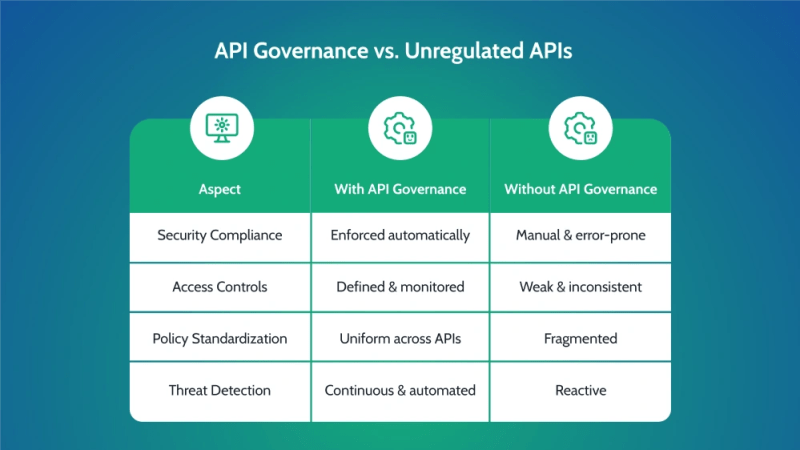
- Why It Matters: API governance ensures consistent security policies, best practices, and compliance across the entire API lifecycle. Without governance, APIs can become unregulated, leading to data exposure, misconfigurations, and security gaps.
MuleSoft’s Anypoint API Governance automates compliance enforcement from API design to deployment.
- API Governance vs. Unregulated APIs
How to Apply API Governance in MuleSoft
- Use pre-defined governance rulesets (e.g., OWASP API Security Best Practices).
- Apply governance policies at design time, not after deployment.
- Monitor compliance status through API Governance Dashboard.
- Enforce automated security scanning in CI/CD pipelines.
- Ensure API documentation and security standards are up to date.
Visual: How API Governance Works in MuleSoft
Governance Profile Setup:
- Create a governance profile in Anypoint Platform.
- Select security rulesets (e.g., Authentication Best Practices, Data Encryption Policies).
- Apply rules to targeted APIs automatically.
- Monitor API conformance status in real-time.
Key Security Tools Recap
- MuleSoft API Manager → Enforces security policies & access controls.
- Anypoint Security → Provides advanced encryption, tokenization, and threat protection.
- API Governance → Ensures compliance and security standardization.
By leveraging these built-in MuleSoft security features, businesses can protect their APIs, prevent security breaches, and comply with industry regulations—all while ensuring seamless API performance.
Final Thoughts: Strengthening MuleSoft API Security for Long-Term Success
As cyber threats evolve, securing MuleSoft APIs is no longer optional—it’s a necessity. With APIs handling critical business data, implementing strong authentication, encryption, rate limiting, and continuous monitoring is key to preventing breaches and ensuring compliance with GDPR, HIPAA, and OWASP security standards.
The Future of AI-Driven API Security
- AI-Powered Threat Detection: Future API security will leverage AI and machine learning to detect anomalous behavior and prevent real-time threats.
- Zero Trust Security Models: APIs will adopt zero-trust architectures, requiring continuous authentication to minimize security risks.
- Automated Security Governance: Self-healing security policies will help organizations enforce compliance and auto-remediate vulnerabilities before they become threats.
How Organizations Can Stay Ahead of Evolving Threats
- Adopt proactive security strategies by using Anypoint API Governance to enforce best practices.
- Automate security testing within CI/CD pipelines to catch vulnerabilities before deployment.
- Leverage AI-driven monitoring tools for real-time security insights and threat mitigation.


