
Code coverage is a metric that can be used to check the percentage of source code that has been tested using test cases. In this blog we will be discussing about generating and uploading Mule Munit coverage reports to IZ Analyzer.
Overview
IZ Analyzer aims to improve the quality of your Mule source code using static code analysis by reporting Bugs, Vulnerabilities, Code Smells, Project Score and various other metrics.
Code coverage is equally important to ensure that the source code is completely tested with all positive and negative scenarios.
The coverage report indicating the percentage of coverage, details of source code that are not covered by test cases should be available along with the static code analysis results for better visibility.
Pre-requisites
This post assumes that uses already have a sample Mule project with few MUnit test cases. For more information on generating MUnit test cases refer MUint Overview
NOTE: IZ Analyzer does not run MUnit tests cases or generates coverage reports. It only imports the pre-generated reports in JSON format .
How to generate coverage report
Coverage report should be configured in JSON format for IZ Analyzer to scan and upload the report. Refer Maven Configuration for Coverage
Plugin reference to be included in pom.xml. Make sure <format>json</format> is included in the configuration as shown below –
<plugin>
    <groupId>com.mulesoft.munit.tools</groupId>
    <artifactId>munit-maven-plugin</artifactId>
    <version>${munit.version}</version>

    <executions>
        <execution>
            <id>test</id>
            <phase>test</phase>
            <goals>
                <goal>test</goal>
                <goal>coverage-report</goal>
            </goals>
        </execution>
    </executions>

    <configuration>
        <coverage>
            <runCoverage>true</runCoverage>
            <failBuild>false</failBuild>
            <formats>
                <format>json</format>
                <format>html</format>
            </formats>
        </coverage>
    </configuration>
</plugin>
Before scanning the project using IZ Analyzer, make sure MUnit test cases are executed and coverage report is generated by executing mvn clean test or mvn clean package.
Coverage Report Upload
Scan the project using IZ Analyzer to get the static code analysis results and coverage report uploaded to server. For more information on how to scan the project using IZ Analyzer refer Code Analysis .
IZ Analyzer automatically detects the coverage report based on the Mule version being used. No additional configuration parameters are required to enable scanning of coverage reports.
Following directories will be scanned for coverage report based on the mule version. (These are the default locations where MUnit coverage reports will be generated) –
- Mule 3
target/munit-reports/coverage-json/report.json - Mule 4
target/site/munit/coverage/munit-coverage.json
On successful analysis static code analysis results and coverage report should be uploaded to server.
In the below image we should see the overall coverage percentage along with the static code analysis results.
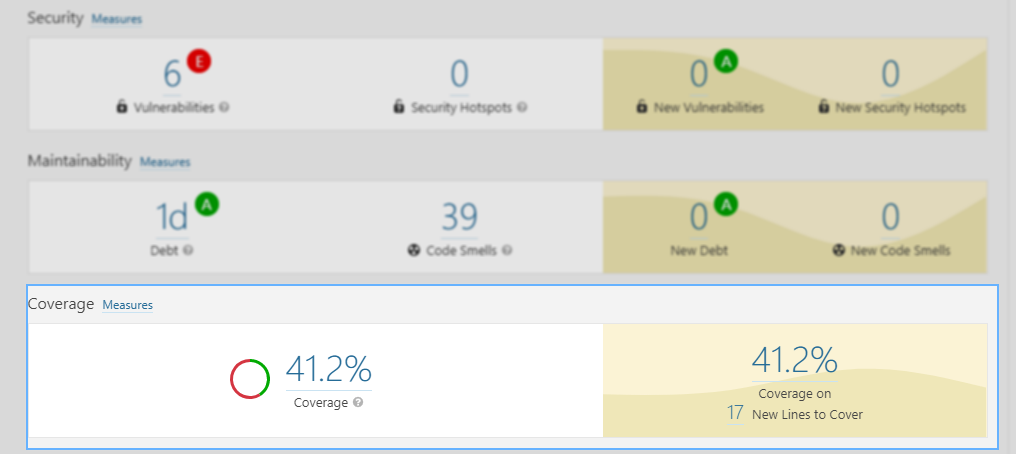
In the above example, we see that only 41.2% of the source code has been covered by test cases. Lets drill down to check the coverage percentage on individual file.
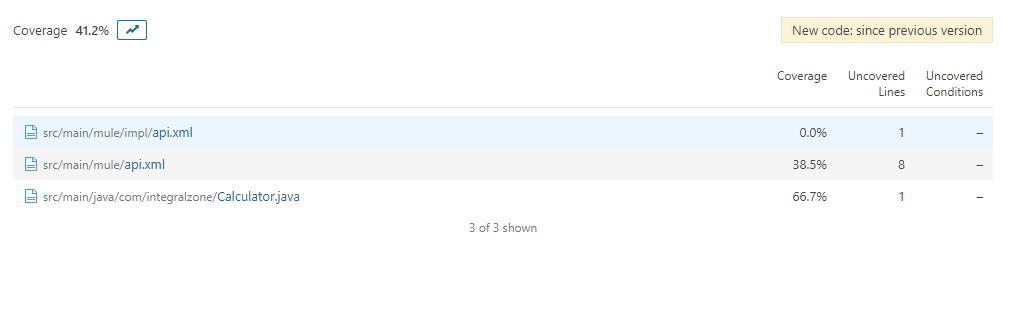
In the above example, we see the coverage percentage on a file to file basis. Lets drill down again into one of the files to check the actual source code coverage.
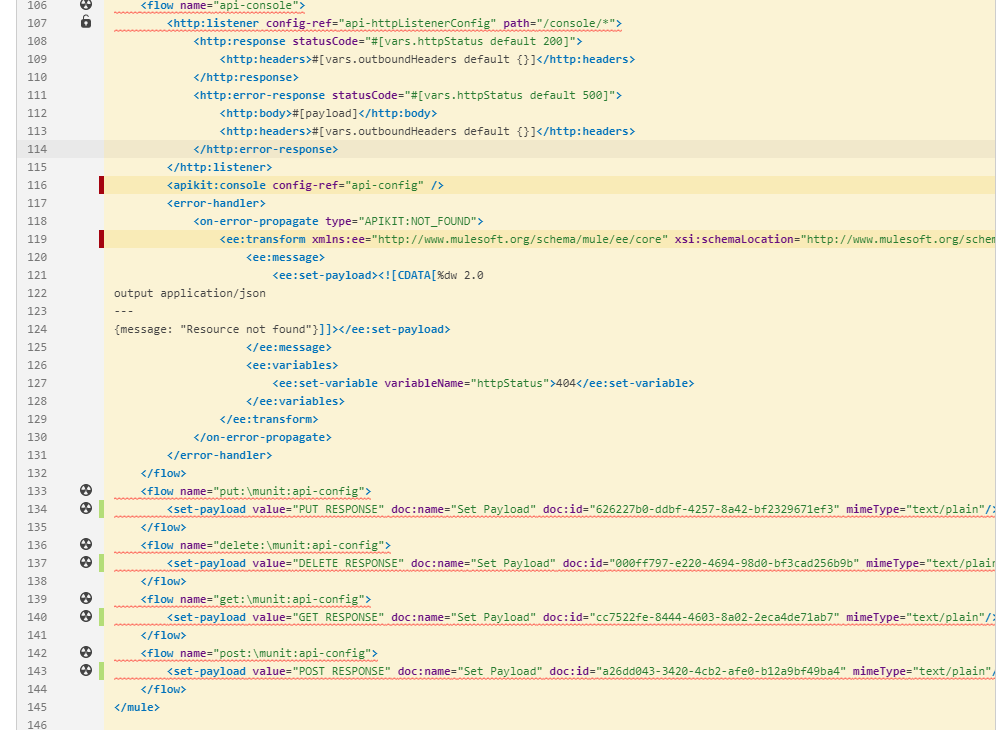
In the above example, the green bars on the left indicates the blocks of code that have been covered by test cases. The red bars on the left indicate the blocks of code that have not been covered by the test cases.
End Note
Hope you found this article interesting. Do drop us a comment below with your inputs, views, and opinions regarding uploading Mule coverage report using IZ Analyzer.
Mulesoft Code Analysis
Interested in trying our automated Mulesoft Code Analysis tool? Try out our free online scanner https://analyzer.integralzone.com/try
Learn how IZ Analyzer reduces project costs by over 80%
Quantifying Benefits of IZ Analyzer for Mule Projects

Discover more from Integral Zone
Subscribe to get the latest posts sent to your email.