
APIs now account for 83% of all internet traffic – but shockingly, over 40% of API vulnerabilities go undetected until it’s too late. That’s a serious gap in security, especially when APIs serve as the backbone of modern digital ecosystems.
Just ask Facebook or Peloton. Both tech giants suffered high-profile breaches—rooted in API misconfigurations—that exposed millions of users’ personal data. These weren’t exotic zero-days. They were preventable flaws in everyday API usage.
So if your enterprise runs on MuleSoft, your APIs must be more than functional—they need to be bulletproof.
In this guide, we’ll walk you through:
- Security best practices at every phase (design, development, deployment)
- Tools like API Manager, IZ Suite & WAFs
- Compliance strategies for HIPAA, SOC 2, and more
- How to detect, prevent, and respond to API threats before they cause damage
Why Preventing MuleSoft API Security Vulnerabilities is Critical in Today’s Digital Ecosystem
APIs have become the backbone of modern digital infrastructure — and MuleSoft, with its powerful integration capabilities, is right at the center.
But as API usage skyrockets, so does the risk. Just look at the trend:
API-based attacks have risen dramatically from 2015 to 2025, with a sharp spike post-2020 due to the explosion of cloud-native and mobile-first apps.
Here’s why that matters now more than ever:
- More APIs = Bigger Attack Surface: Every exposed endpoint is a new door for attackers.
- Real Breaches, Real Consequences: From Peloton’s exposed user data to Facebook’s massive Graph API misconfigurations — API failures cost more than just downtime.
- Regulatory Landmines: GDPR, HIPAA, and SOC 2 demand strict API controls — violations come with heavy fines and reputational damage.
How Secure Are MuleSoft APIs? Understanding Built-in Security Architecture
MuleSoft’s Anypoint Platform offers a solid foundation for API security — but like any powerful tool, it’s only as effective as its implementation. While MuleSoft includes robust built-in defenses, many real-world vulnerabilities stem from misconfigurations, underused features, or gaps in governance.
Here’s a quick breakdown of core security components:
| Feature | Built-in Security Benefit | Still Needs |
| API Manager | Access control, policy enforcement | Fine-tuned configuration |
| Anypoint Security | TLS encryption, tokenization | Skilled setup and maintenance |
| Secrets Manager | Secure credential storage | Governance + access policies |
MuleSoft Default vs. Custom Hardening
- Default Setup: TLS enabled, basic policies applied
- Hardened Setup: Rate limiting, IP filtering, custom JWT validation, CORS control, token expiration handling, secure vault integration
In other words, MuleSoft gives you the security toolkit — but it’s your job to wield it well.
For example, the Secrets Manager will encrypt your credentials, but without proper governance, those secrets could still be exposed.
Similarly, the Anypoint API Manager can enforce policies, but if you don’t tailor those to your business needs, vulnerabilities can slip through.
Related Read – Top Security Risks in MuleSoft APIs (And How to Prevent Them)
Most Common Security Vulnerabilities in MuleSoft APIs
While MuleSoft offers a robust security foundation, vulnerabilities often arise from how developers implement, configure, or overlook its controls.
Below is a high-level snapshot of common security flaws that can creep into MuleSoft APIs — along with their potential consequences:
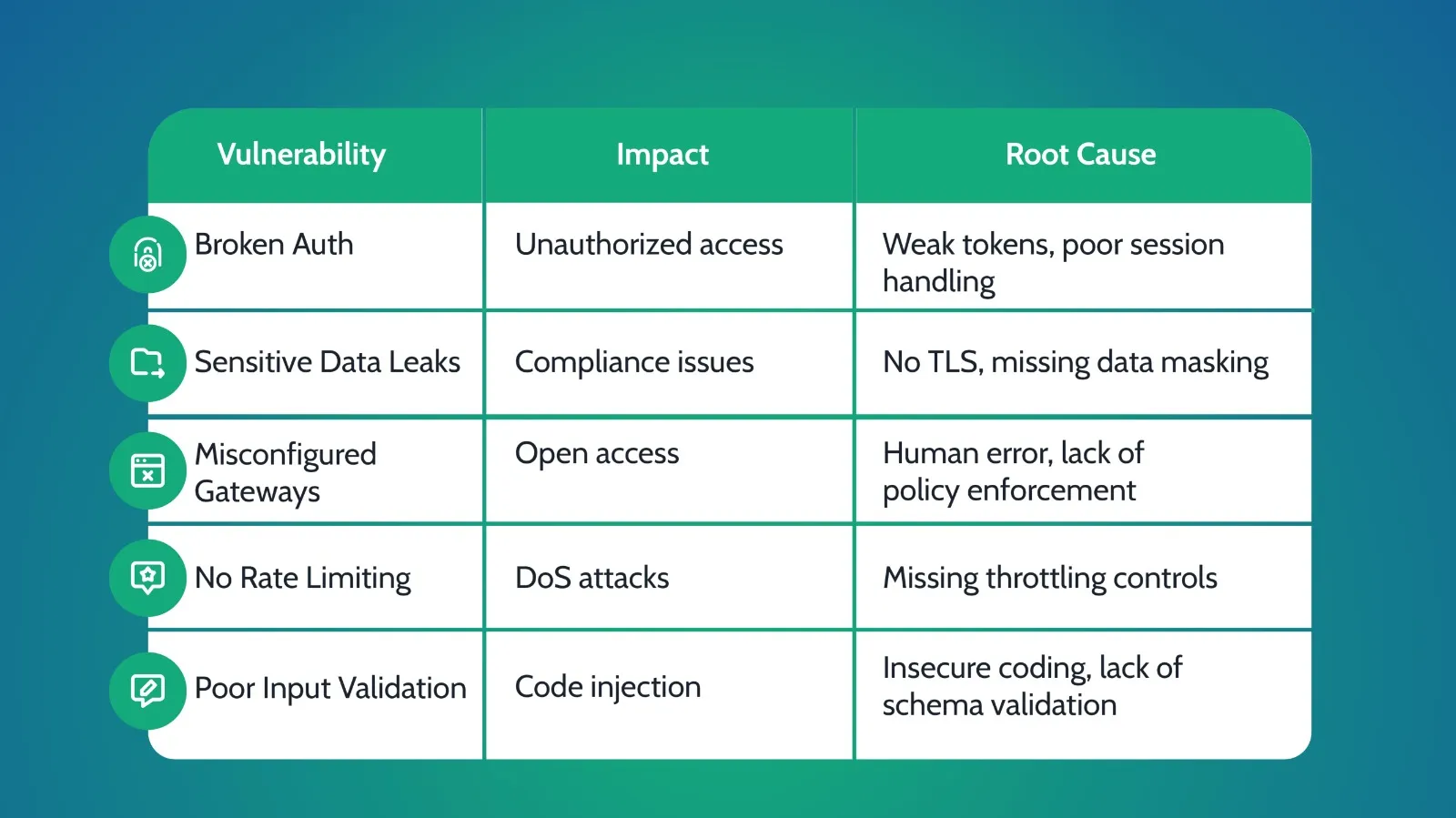
Broken Authentication and Authorization
Checklist to Prevent Broken Auth:
- Implement OAuth 2.0 with short-lived access tokens and refresh tokens
- Use Multi-Factor Authentication (MFA) for sensitive endpoints
- Enforce Role-Based Access Control (RBAC) using scopes and permissions
- Validate JWT signatures and expiry server-side
Token-Based vs. Session-Based Authentication
| Auth Type | Pros | Cons |
| Token-Based (JWT) | Stateless, scalable, mobile-friendly | Token revocation is complex |
| Session-Based | Easy to revoke, simple state control | Less scalable, server-side memory load |
Tip: In MuleSoft, combine JWT token validation with API Manager’s role-based policies to enforce granular access control.
Sensitive Data Exposure via Unencrypted Channels
Sending data in clear text or without adequate masking can lead to devastating leaks — especially when dealing with PII, financial data, or credentials.
| Before (Insecure): | After (Secure): |
| http POST http://api.example.com/loginContent-Type: application/json { “username”: “admin”, “password”: “SuperSecret123” } | http POST https://api.example.com/loginContent-Type: application/json { “username”: “admin”, “password”: “•••••••••” } |
Best Practices to Protect Sensitive Data:
- Enforce TLS 1.3 for all APIs — never allow HTTP
- Mask PII (emails, phone numbers, SSNs) in logs and error responses
- Use field-level tokenization for credit cards, health records, etc.
- Use secure logging frameworks that redact or ignore sensitive payloads
Misconfigured API Gateways or Open Endpoints
Many breaches stem not from poor code — but from poor configurations. An open endpoint or gateway without policies is an open door.

Tips to Harden API Gateways:
- Automate policy deployment via CI/CD pipelines
- Regularly audit exposed endpoints using tools like OWASP ZAP or Shodan
- Avoid using wildcard routes (e.g., /api/*) without strict rules
- Enforce IP whitelisting and header validation for sensitive services
Absence of Rate Limiting, Exposing APIs to DDoS Attacks
When APIs lack throttling controls, attackers can overload services — not just intentionally, but even through poorly optimized client usage.
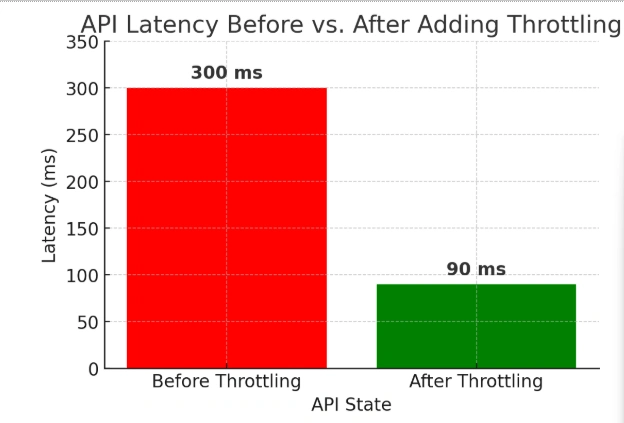
Types of Rate Limiting in MuleSoft:
| Policy Type | Description |
| Fixed Rate | X requests per second (e.g., 100 req/sec) |
| SLA-Based | Custom limits per client tier (Gold, Silver, etc.) |
Sample MuleSoft Config:
| xml <rate-limit policy=”fixed” requests=”100″ timePeriod=”1″ timeUnit=”minute”/> |
Best Practice: Always combine rate limiting with Spike Control and SLA tiers to balance security and performance.
Inadequate Input Validation
Unvalidated input is the root of injection attacks — from SQL to XML bombs. This risk multiplies in API-first systems with numerous integrations.
Raw vs. Validated Payload
| Without Validation: |
|---|
| json { “email”: “admin@example.com<script>alert(‘xss’)</script>” } |
| With Validation: |
|---|
| json { “email”: “admin@example.com” } |
Checklist for Strong Input Validation:
- Use JSON Schema or RAML-based validations at the entry point
- Whitelist input types and formats (e.g., regex for email, phone)
- Enforce max length, character sets, and disallow nested payloads
- Sanitize inputs before processing or storing
- Validate both on client-side and server-side
How to Prevent API Security Vulnerabilities in MuleSoft: Best Practices for Developers and Architects
Preventing security issues in MuleSoft APIs isn’t about patching holes after something breaks — it’s about embedding security into every phase of the API lifecycle:
design, development, and deployment. Below, we’ll walk through what secure API building looks like step-by-step, with actionable insights developers and architects can implement right away.
Design Phase – Secure API Design Principles
Think of this as the blueprint stage. The earlier you build security into your APIs, the fewer vulnerabilities you’ll face downstream.
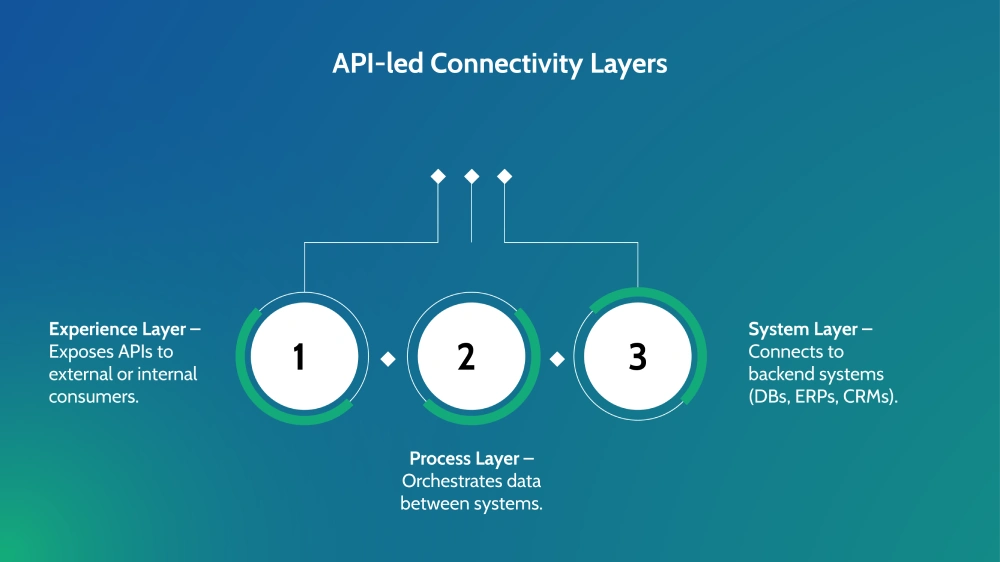
Each layer is an opportunity — and a risk — if not designed with security in mind.
Secure Design Checklist:
Secure-by-Design Mindset
Use principles like least privilege, fail securely, and complete mediation. Every API should start with a security model — not get one tacked on later.
Access Controls Defined Early
Include role mappings, access scopes, and identity types (users, systems, apps) in your design documents. Don’t leave access decisions to implementation time.
Use Standardized Policies
MuleSoft offers reusable policies like JWT validation, IP allow-listing, and rate limiting. Document which ones apply to each API layer and enforce them by default.
Avoid Overexposure
Apply data minimization in your design. Only return what is needed. Avoid exposing large objects or entire records when only a subset is required.
Version Your APIs Thoughtfully
Never break existing clients. Decommission old versions carefully with advance warnings, and always document deprecation timelines.
Development Phase – Secure Coding Practices
This is where great design gets translated into real-world behavior — and where most security flaws creep in. MuleSoft developers must follow secure coding practices to avoid creating vulnerabilities in flows, expressions, and connectors.
Dev Tips for Secure MuleSoft Coding:
- Never Hardcode Secrets
Use the Secure Properties Tool or Secrets Manager. Hardcoding credentials, tokens, or keys in configs is an open invitation for leakage. - Use Encrypted Configuration Properties
Wrap sensitive variables in property placeholders like ${secure::db.password} and store them securely. MuleSoft supports FIPS 140-2 compliant encryption modules. - Avoid Dynamic Queries or Direct DB Access
Always use pre-built connectors with parameterized inputs. Never construct SQL queries using string concatenation — it’s a top cause of injection attacks. - Validate and Sanitize All Input
Every payload should be treated as untrusted. Validate incoming data structures with schema validation policies or custom DataWeave expressions.
DataWeave Input Sanitization Example:
| dw %dw 2.0 output application/json var unsafeInput = payload.name — { name: unsafeInput as String {default: “anonymous”} as String {maxLength: 100} as String {matches: /^[a-zA-Z0-9\s]+$/} } |
This snippet:
- Provides a fallback for empty values.
- Limits input length.
- Enforces character patterns to prevent injection.
Unit Test with Malicious Inputs
Simulate attacks like script injection, deep nesting, and malformed JSON during your unit tests to ensure your flows fail securely.
Related Read – MuleSoft API Governance Guide
Deployment Phase – Secure Deployment and Continuous Monitoring
You’ve designed securely and coded defensively — now it’s time to deploy with confidence and vigilance. Whether you’re deploying to CloudHub, Runtime Fabric, or hybrid architectures, the right security posture is crucial.
CloudHub vs. Runtime Fabric: Security Comparison Table
| Feature | CloudHub | Runtime Fabric |
| Built-in TLS | Enabled by default | Requires explicit config |
| Isolation | Multi-tenant (with controls) | Fully isolated per customer |
| VPC / Firewall Control | Provided via Shared Load Balancer | Fully customer-managed |
| Secrets Management | Available via Secure Properties Tool | Also supports external vaults |
| Monitoring & Alerts | Anypoint Monitoring | Requires integration or agent-based |
Recommendation: If you’re managing high-compliance workloads (HIPAA, PCI), Runtime Fabric with external vaults and enhanced controls is preferred.
Continuous Monitoring Essentials:
Anypoint Monitoring
Use built-in dashboards to track latency, request volumes, error rates, and throughput across environments. Set threshold-based alerts for suspicious patterns.
Alert on Auth Failures
Create alerts for repeated failed login or token validation attempts — these could signal brute force or credential stuffing attacks.
Pro Tip: Enable Request/Response Logging with Masking
Never log PII or tokens in raw form. Use log masking policies to redact sensitive fields before logging.
Disable Non-Essential Features
Block access to unused ports, disable admin APIs on exposed interfaces, and restrict debug access in production.
Automate Security Checks in CI/CD
- Run static code scans on Mule flows and DataWeave.
- Enforce policy deployment via scripts (Anypoint CLI or Maven plugins).
- Trigger security tests (like APIsec or OWASP ZAP) post-deploy to staging.
In Summary – Lifecycle Security Snapshot:

What Tools Does MuleSoft Provide to Enhance API Security?
Securing APIs in complex enterprise environments requires more than just good intentions — it requires purpose-built tools. Fortunately, MuleSoft comes equipped with a powerful set of built-in and extendable security tools that help teams proactively identify, manage, and mitigate security risks.
Below is a breakdown of the most essential tools within the MuleSoft security ecosystem and how they can be applied in real-world use cases.
MuleSoft Security Toolbox
| Tool | Purpose | Example Use |
| API Manager | Centralized policy enforcement | Apply OAuth 2.0, IP filtering, and rate limits with zero code changes. |
| Anypoint Security | Network and edge protection | Use TLS 1.3 for encrypted transport and enable tokenization for PII protection. |
| IZ Suite (by Integral Zone) | Governance & compliance enforcement | Scan Mule flows for hardcoded credentials or unvalidated inputs before deployment. |
How They Work Together:
- API Manager enforces fine-grained access control without changing your API logic. You simply attach policies through the UI or CI/CD.
- Anypoint Security operates at the infrastructure level — protecting traffic at the edge, controlling firewall rules, and ensuring secure communications.
- IZ Suite brings a DevSecOps mindset to MuleSoft projects. It automates secure coding checks, provides visibility into compliance gaps, and integrates with CI pipelines.
MuleSoft offers a robust foundation for securing your APIs. But just like a seatbelt in a car — it only works when you use it correctly, consistently, and with full visibility.
Does MuleSoft Support Compliance with US Security Standards Like HIPAA and SOC 2?
If you’re working in a regulated industry — healthcare, finance, or government — API security isn’t just best practice, it’s a legal necessity. The good news? MuleSoft offers strong foundational features to help meet critical compliance frameworks like HIPAA, SOC 2, and GDPR.
At a Glance – What’s Covered?
- HIPAA: Protects personal health data (PHI) — MuleSoft supports this with TLS encryption, audit logging, and role-based access control (RBAC).
- SOC 2: Focuses on security, availability, and processing integrity — MuleSoft offers change tracking, runtime performance monitoring, and alerting.
- GDPR: European regulation that mandates data privacy — MuleSoft enables tokenization, field-level data masking, and user data access control.
Compliance Feature Grid
| Standard | MuleSoft Features | Developer Actions |
| HIPAA | TLS, audit logs, RBAC | Encrypt PHI, restrict access via roles |
| SOC 2 | Runtime monitoring | Track config changes, enforce alerts |
| GDPR | Tokenization, masking | Minimize data exposure, enable erasure requests |
Final Thoughts – Securing MuleSoft APIs for Resilience, Compliance, and Trust
Securing MuleSoft APIs isn’t just a box to tick — it’s a mindset.
In today’s threat-heavy landscape, where APIs power everything from mobile apps to mission-critical systems, a strong security posture protects your business, your customers, and your reputation.
3 Key Takeaways to Keep Top of Mind:
- Secure design = secure APIs: Security must start at the whiteboard. Build with best practices like least privilege, input validation, and encrypted data flows baked in from day one.
- Leverage built-in tools: MuleSoft offers powerful assets like API Manager, Anypoint Security, and IZ Suite. Use them strategically — and don’t overlook policy enforcement or gateway configurations.
- Monitor continuously: Don’t “set it and forget it.” Track auth failures, traffic spikes, and anomalies using tools like Anypoint Monitoring or external solutions like Splunk and IZPulse.
FAQs – Preventing MuleSoft API Security Vulnerabilities
1. What are the most common security vulnerabilities in MuleSoft APIs?
Common issues developers face include:
- Injection attacks (e.g., SQL, XSS, command injection)
- Broken authentication and session management
- Sensitive data leaks (unencrypted fields, overly permissive logs)
2. How can API Manager be used to enforce API security policies?
MuleSoft’s API Manager makes it easy to apply security policies without touching your code. Key prebuilt policies include
- OAuth 2.0 for secure user authorization
- Rate limiting to prevent abuse or DDoS attacks
- CORS control to limit cross-origin requests
3. Is IZ Suite effective for identifying API security flaws in MuleSoft projects?
Yes, IZ Suite is purpose-built for MuleSoft governance, offering robust API security scanning capabilities. It enables teams to run pre-deployment scans, automate security checks within CI/CD pipelines, and catch configuration drift, compliance issues, and insecure flows early in the development cycle. By integrating IZ Suite, organizations can proactively detect and mitigate vulnerabilities before they become exploitable threats.
4. Do I need third-party tools, or are built-in tools enough?
MuleSoft’s built-in security tools provide strong foundational protection, but real-world security often benefits from a defense-in-depth approach. To enhance security, organizations should consider additional tools like Splunk or Datadog for extended observability, Ping Identity for advanced identity management, and APIsec for intelligent, automated penetration testing. These complementary solutions help create a more comprehensive security posture, ensuring APIs remain resilient against evolving threats.
5. How does MuleSoft help organizations comply with HIPAA and SOC 2 standards?
MuleSoft provides multiple security features to help organizations achieve regulatory compliance with HIPAA, SOC 2, and other standards. Key capabilities include TLS encryption for securing data in transit, role-based access control (RBAC) to manage user permissions, and Secrets Manager for securely storing credentials. Additionally, MuleSoft supports log retention and audit trails for tracking API activity, while built-in policy enforcement mechanisms help align API security practices with industry regulations.
6. What’s the best way to continuously monitor MuleSoft APIs for threats?
A layered monitoring approach is the most effective way to ensure continuous security for MuleSoft APIs. Anypoint Monitoring dashboards provide real-time API insights, while Log4j2 integration with tools like Splunk or Datadog enables deep log analytics and anomaly detection. Additionally, traffic anomaly detection tools can flag irregular behaviors, helping security teams quickly identify and respond to potential threats before they escalate.
Discover more from Integral Zone
Subscribe to get the latest posts sent to your email.