
Did you know that 90% of security vulnerabilities in APIs are caused by human error? Imagine launching a critical MuleSoft integration, only to discover a security flaw just before go-live. Manual code reviews are slow, inconsistent, and prone to oversight, leading to delays, technical debt, and security risks.
A global enterprise using Falcon Scan automated code reviews reduced errors by 80%, ensuring compliance and accelerating deployments. MuleSoft automated code reviews transform development by catching vulnerabilities before they reach production—enhancing security, reliability, and scalability. Isn’t it time to automate MuleSoft code scanning and eliminate manual effort?
Why Automating MuleSoft Code Scanning is Essential
Relying on manual code reviews for MuleSoft applications is like searching for a needle in a haystack—slow, inefficient, and dangerously prone to oversight. Without automation, critical security vulnerabilities and performance bottlenecks often slip through the cracks, leading to delayed deployments, increased costs, and compliance risks.
Take the infamous Equifax breach, for example—one unpatched vulnerability exposed 147 million records, costing the company over $700 million in damages. Now, imagine similar risks lurking in your MuleSoft APIs due to inconsistent manual reviews. Can you afford the consequences?
Challenges of Manual Code Scanning in MuleSoft
Here’s why automating MuleSoft code scanning is no longer a luxury but a necessity:
| Challenges | Impact on Development |
| Time-Consuming | Slows down project delivery and innovation |
| Prone to Human Error | Leads to security vulnerabilities & compliance risks |
| Lack of Standardization | Inconsistent code quality across teams |
| Late Bug Detection | Increases costs & delays in fixing critical issues |
Manual scanning lacks real-time analysis, leaving teams to play catch-up. With tools like Falcon Scan, MuleSoft automated code reviews ensure instant vulnerability detection, standardization across projects, and compliance enforcement—all within your CI/CD pipeline.
The choice is clear: either spend hours manually scanning code or let automation handle it seamlessly, reducing errors by 80% while accelerating deployments. Which path will you take?
Key Benefits of Automating MuleSoft Code Scanning
Automating MuleSoft code reviews eliminates these inefficiencies by integrating real-time scanning into CI/CD pipelines. Companies using automated scanning tools like Falcon Scan report:
- 80% faster code review cycles, enabling faster releases 🚀
- Significant cost savings by reducing manual QA effort
- Standardized best practices, ensuring consistent, high-quality code across teams
- Early vulnerability detection, preventing security breaches before deployment
- 265% ROI, as reported by companies that switched to automated scanning
For MuleSoft teams handling complex integrations and APIs, manual scanning is no longer an option. With automation, security gaps are detected before they cause failures, reducing technical debt and ensuring compliance—all while accelerating delivery.
Common Challenges in Manual MuleSoft Code Scanning
Despite its importance, manual code scanning remains a time-consuming, error-prone process for many MuleSoft teams. Without automation, developers face delays, inconsistencies, and security risks—leading to costly post-deployment fixes. Here’s why traditional manual scanning is holding teams back:
1. High Time and Resource Consumption
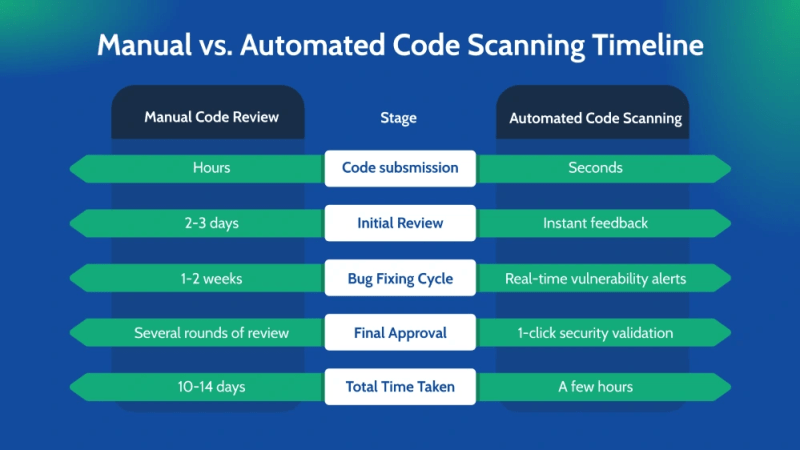
Imagine this: a MuleSoft integration project is nearing deployment. The team schedules a manual code review, which requires multiple rounds of back-and-forth between developers and reviewers. The process drags on for days—sometimes weeks—before the code is finally approved.
Now, compare that to automated scanning, which runs in minutes as part of the CI/CD pipeline. This difference is game-changing for enterprises looking to accelerate delivery without compromising security.
2. Inconsistent Code Quality Standards
One of the biggest risks in manual code scanning is inconsistency—different developers and reviewers apply different rules, leading to security vulnerabilities and technical debt.
Manual Code Reviews Often Lack:
- Standardized code review policies—Developers follow different coding
- Styles, making it difficult to maintain consistency.
- Uniform review processes—A senior developer might enforce strict security checks, while a junior reviewer could miss critical flaws.
- Real-time feedback—Developers don’t get instant alerts on security issues while coding.
- Compliance enforcement—Without automated validation, teams struggle to adhere to security & industry standards like OWASP and GDPR.
This lack of standardization leads to unpatched vulnerabilities slipping into production, putting businesses at risk of security breaches, compliance fines, and costly rework.
3. Delayed Bug Detection and Fixing
With manual scanning, critical vulnerabilities often remain undetected until after deployment—by then, it’s too late and too expensive to fix them without causing disruption.
Case in point? The infamous Log4j vulnerability—a security flaw that remained undetected for years, affecting millions of applications worldwide. A similar incident hit British Airways, where an unpatched security gap led to a £20 million GDPR fine after hackers stole 400,000+ customer records.
Now, let’s talk about real-world impact:
One of our enterprise clients deployed a MuleSoft API integration, only to find 300+ security vulnerabilities post-launch. These issues could have resulted in data breaches and compliance violations.
After switching to Falcon Scan, their team reduced bug detection time by 90%, fixing issues before they reached production—saving them millions in potential fines and downtime.
Manual scanning is simply too risky for today’s fast-moving, security-focused enterprises. With automated code scanning, teams can detect and fix vulnerabilities in real-time, ensuring secure, high-quality MuleSoft integrations.
Falcon Scan by IZ: The Best Tool for Automating MuleSoft Code Scanning
When it comes to MuleSoft automated code reviews, Falcon Scan by IZ stands out as the most advanced solution in the industry. Unlike traditional static code analysis tools, Falcon Scan is purpose-built for MuleSoft, offering 230+ built-in rules, real-time feedback, and seamless CI/CD integration—ensuring secure, compliant, and high-quality MuleSoft implementations at every stage of development.
1. Why Choose Falcon Scan?
Unlike generic code review tools, Falcon Scan is tailored specifically for MuleSoft projects, detecting vulnerabilities, coding best practices violations, and compliance issues before they impact production.
Here’s how Falcon Scan transforms MuleSoft development:
| Feature | Benefit |
| 230+ Built-in Rules | Ensures adherence to MuleSoft best practices & security standards like OWASP, GDPR, and PCI-DSS. |
| AutoFix | Instantly fixes detected issues with one click, eliminating manual effort. |
| CI/CD Integration | Seamlessly integrates into DevSecOps pipelines, automating scanning at every commit, merge, or deployment. |
| Real-Time Feedback | Detects issues during development, allowing developers to fix code/issues on the fly in IDE, both in Anypoint Studio plugin as well as Anypoint Code Builder before deployment. |
| FalconPulse Monitoring | Continuously tracks API health, allows users to configure Maintenance Windows, and have public and private status pages. |
2. How Falcon Scan Delivers a 265% ROI in DevSecOps
- Cuts code review costs by eliminating manual reviews and reducing bug-fixing overhead.
- Accelerates development cycles by 80%, allowing teams to deploy MuleSoft applications faster and with higher quality.
- Prevents security vulnerabilities before they reach production—saving enterprises millions in potential breach-related costs.
3. Falcon Scan’s Unique Advantage: AutoFix & Quality Gates
One of Falcon Scan’s most powerful features is AutoFix—which automatically corrects code violations, reducing the burden on developers while ensuring consistent coding standards.
Additionally, Quality Gates enforce security and compliance at every stage of the CI/CD pipeline, blocking insecure code from reaching production—something no other MuleSoft scanning tool offers.
Implementing Automated MuleSoft Code Scanning in CI/CD Pipelines
In today’s fast-paced DevOps landscape, automating MuleSoft code scanning is not just a best practice—it’s a necessity. Manual code reviews are slow, prone to human error, and inconsistent across teams. By integrating automated scanning tools like Falcon Scan into CI/CD pipelines, organizations can enforce security standards, improve code quality, and accelerate deployments.
Here’s how to seamlessly implement automated MuleSoft code scanning in your DevSecOps workflow.
Integrating Automated Scanning in CI/CD Pipelines
A CI/CD pipeline ensures that every code change is automatically built, tested, and deployed with minimal manual intervention. Integrating Falcon Scan into this workflow enables real-time code analysis, preventing security vulnerabilities and non-compliant code from reaching production.
CI/CD Pipeline with Falcon Scan
The diagram below illustrates how Falcon Scan fits into a MuleSoft CI/CD pipeline:
Automated Scanning Workflow

Setting Up Quality Gates for MuleSoft Code
Quality Gates act as security checkpoints in the CI/CD pipeline, ensuring that only secure and compliant MuleSoft applications are deployed. If a code change fails the defined thresholds, the deployment is halted until the issues are fixed.
Here’s an example of how a Quality Gate is implemented in YAML format:
yaml
| quality_gate: minor: 5 major: 0 blocker: 0 |
What This Means?
- Minor Issues → Allows up to 5 minor warnings (e.g., style inconsistencies)
- Major Issues → Blocks the deployment if even one major issue is found
- Blocker Issues → Zero tolerance for security vulnerabilities and compliance breaches

Continuous Monitoring and Feedback Loops
Real-time feedback is critical in DevSecOps. FalconPulse provides continuous monitoring, detecting security threats even after deployment.
- How FalconPulse Enhances Security
Live API Monitoring → Tracks API health, performance, and security threats
Instant Alerts → Notifies teams immediately about critical vulnerabilities
Auto-Remediation Suggestions → Provides real-time fixes for detected issues
Below is an example screenshot of FalconPulse Alerts, showing how it identifies risks before they escalate:

💡 By integrating automated MuleSoft code scanning into CI/CD pipelines, teams can proactively eliminate security threats, accelerate development, and ensure regulatory compliance—without slowing down innovation. 🚀
Best Practices for Reducing Manual Effort in MuleSoft Code Scanning
Manually reviewing MuleSoft code is time-consuming, error-prone, and inconsistent across teams. As MuleSoft applications grow, automating code scanning becomes essential to maintain security, enhance efficiency, and enforce quality standards. Here’s how organizations can reduce manual effort while improving code quality.
Standardizing MuleSoft Code Review Guidelines
One of the primary reasons manual code reviews become inefficient is the lack of standardized guidelines. Without a clear framework, different teams enforce different standards, leading to security gaps, inconsistent coding styles, and poor maintainability.
Best Practices Checklist for MuleSoft Code Reviews

Automating Repetitive Code Review Tasks
Traditional manual code reviews consume significant time and developer effort. By automating repetitive checks, teams can reduce review time from days to hours while ensuring accuracy and compliance.
Before vs. After Automation: A Side-by-Side Comparison
| Manual Review | Automated Review |
| Takes 3-5 days per review | Reduces review time to a few hours |
| Prone to human error and oversight | Ensures consistent, accurate results |
| Requires senior developers for reviews | Works across all experience levels |
| Reactive bug detection | Proactive issue prevention |
| No real-time feedback | Instant alerts inside Anypoint Studio |
Example: A global enterprise using Falcon Scan reduced their MuleSoft code review cycles by 80%, enabling faster releases without compromising security.
Implementing a Shift-Left Approach for Code Quality
The Shift-Left Testing strategy helps organizations catch security vulnerabilities, coding errors, and compliance violations early in development, preventing expensive fixes later.
Traditional Approach vs. Shift-Left Testing Timeline
- Traditional Approach
Development Begins → Code is written → Manual reviews happen at the end → Critical security issues detected late → Costly fixes & deployment delays
- Shift-Left Approach
Security Testing Starts Early → Automated scans run continuously → Developers get real-time feedback → Fewer late-stage defects → Faster & safer deployments

Benefits of Shift-Left Testing in MuleSoft Development
- Reduces rework costs by fixing vulnerabilities in early development
- Speeds up CI/CD pipelines by automating security scans before deployment
- Enhances developer efficiency by providing instant feedback within Anypoint Studio
- Prevents security breaches by identifying risks early

| Key Takeaways: Simplify MuleSoft Code Reviews with Automation | |
| ✔ | Adopt standardized MuleSoft coding guidelines to ensure consistency and compliance |
| ✔ | Leverage automated tools like Falcon Scan & Falcon Scan to reduce manual review time |
| ✔ | Integrate Quality Gates into CI/CD pipelines to block non-compliant code |
| ✔ | Implement a Shift-Left strategy to detect vulnerabilities before they become major issues |
FAQs: Automating MuleSoft Code Scanning
As more organizations adopt automated MuleSoft code scanning, common questions arise about its benefits, integration, and best practices. Here are the top FAQs to help you better understand how automation can streamline code reviews and enhance security.
1. How does automating code scanning benefit MuleSoft development?
- Cuts code review time by 80% → Automated scanning eliminates manual bottlenecks, ensuring faster releases
- Enhances security → Detects vulnerabilities, API misconfigurations, and security loopholes early
- Enforces best practices → Ensures coding consistency, maintainability, and compliance
💡 Example: A financial services company using Falcon Scan reduced its security issues by 90% within the first three months of implementation.

2. How can CI/CD integration improve automated code scanning?
- Ensures Quality Gates block bad code before deployment
- Runs continuous scans in the CI/CD pipeline, preventing security risks
- Reduces manual intervention, allowing developers to focus on innovation
Example: A global retail company integrated Falcon Scan into their CI/CD pipelines, leading to 50% fewer post-deployment defects.
3. How does automated scanning help in reducing technical debt?
- Identifies vulnerabilities and coding inefficiencies early
- Prevents security flaws from accumulating across multiple releases
- Saves remediation costs by fixing issues proactively
Fact: Companies using automated scanning experience 265% ROI due to reduced bug-fixing costs and faster go-to-market speeds.
4. What are the key considerations when implementing automated code scanning?
- Choose a tool with AutoFix → Allows one-click fixes for common issues
- Ensure seamless CI/CD integration → Enables real-time security enforcement
- Look for compliance tracking → Helps meet GDPR, OWASP, and HIPAA standards
Manual code reviews slow you down and leave security gaps. Falcon Scan automates MuleSoft code scanning, slashing errors by 80% and securing your APIs before deployment. Add FalconPulse for real-time threat detection—because security should never be an afterthought. 🚀 Book a Free Demo Now!


